NTA provides a free JEE Main Mock Test which can be accessed online through the official website. Solving mock tests helps in understanding the exam pattern, difficulty level, weightage and time management.
These free online mock tests help students analyse their performance through detailed score reports and topic-wise feedback. By revising concepts based on mock test analysis, candidates can strengthen important chapters and fine-tune their exam strategy. In this article, we have shared how to access NTA JEE Main mock tests, their benefits, and a strategy to use them effectively for a higher score.
Where to Access Free JEE Main Mock Tests?
There are two primary sources for free JEE Main mock tests:
- NTA Official Portal (nta.ac.in/quiz): Tests are designed by NTA and simulate the exact CBT interface used in the real exam, including the same timer, question palette, and colour-coded symbols. No login or registration is needed to access NTA JEE Main mock tests.
- National Test Abhyas App: NTA provides an official mobile app for JEE Main preparation. This app is available on the Android and iOS Store, allowing candidates to download full-length mock tests and attempt them offline. It is best for students who want to practice without a stable internet connection.
What Types of JEE Main Mock Tests to Use?
Not all practice is equal. The table below outlines the different types of JEE Main mock tests you should be using:-
| Type | Best used for | When to use |
| Full-length mock test (75 Qs, 3 hrs) | Simulating real exam conditions, time management | 2 months before the exam onwards |
| Chapter-wise tests | Targeting weak chapters after analysis | Throughout preparation |
| Subject-wise sectional tests | Improving accuracy in one subject | When one subject is dragging your score |
| Previous year papers (as mock) | Understanding NTA’s question style, difficulty | From 3 months before the exam |
| Memory-based current-year papers | Getting a feel for the latest shift patterns | After each exam session |
How to Attempt JEE Main Mock Test?
Practice NTA JEE Main mock tests online using the following process:-
- Visit the official website https://www.nta.ac.in/quiz
- Select exam “JEE Main” & Paper from the list available.
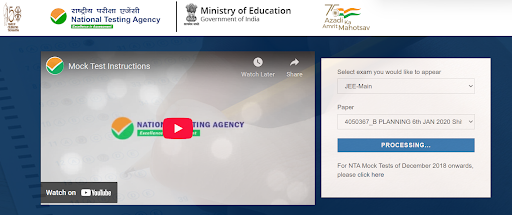
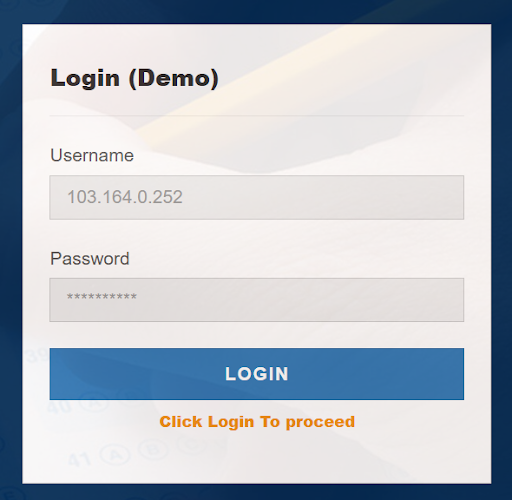
A new page will open for login. By default, a username & password are already set. Just click on “Login”.
- Read all the instructions carefully and click on “Proceed”.
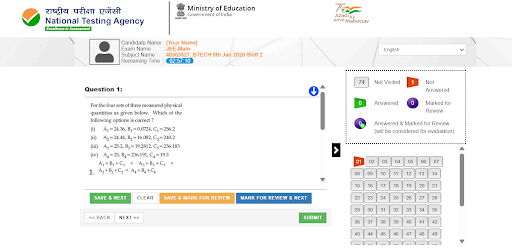
- After that, the mock test will start and look like this.
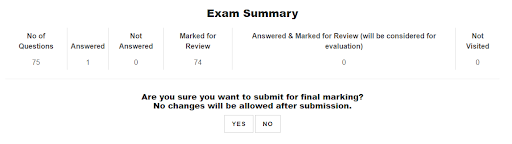
- Upon submission, the exam summary will be shown
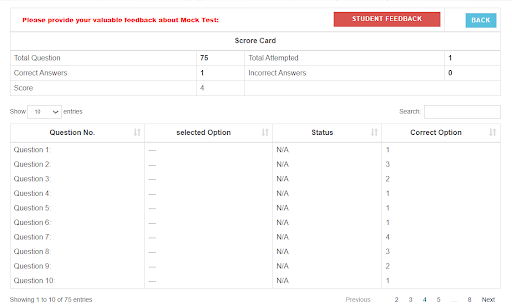
- Upon final submission, the result/ scorecard will be displayed.
How to Navigate to a Question While Attempting JEE Main Mock Test?
To answer a question in a mock test for JEE Main 2027:
- Click the question number in the Question Palette (on the right) to jump directly to it. Note: This does not save your current answer.
- Click Save & Next to save your answer and move to the next question.
- Click Mark for Review & Next to mark for review, then save and proceed to the next question.
How to Answer JEE Main Mock Test MCQs?
- To select your answer: Click the button next to one of the options.
- To deselect: Click the selected option again or use the Clear Response button.
- To change your answer: Click a different option’s button.
- To save: Always click Save & Next.
- To mark for review: Click Mark for Review & Next.
- To edit a saved answer: Return to the question via the Question Palette, then follow the steps above.
How to Navigate Between Sections of JEE Main Mock Test?
- Section names appear on the top bar of the screen. Click any section name to view its questions. The active section stays highlighted.
- After clicking Save & Next on the last question of a section, you automatically move to the first question of the next section.
- Switch between sections and questions anytime during the exam, within the time limit.
- View the section summary in the legend above the Question Palette for quick status checks.
Download Free JEE Main Previous Year Question Papers
JEE Main Mock Test 2027: Important Instructions
- The total duration of the selected Free JEE Main Mock test series is 180 Mins.
- A countdown timer in the screen’s top right corner shows your remaining exam time.
- The test ends automatically when it hits zero. No need to submit or end it yourself.
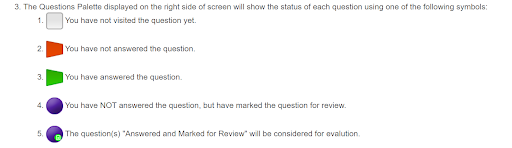
- The Question Palette on the right side of the screen shows the status of each question using different symbols. Each symbol indicates whether a question is visited, answered, unanswered, or marked for review during the exam.
- The grey symbol indicates you have not visited the question yet.
- Red symbol indicates you have not answered the question.
- Green symbol indicates you have answered the question.
- Purple symbol indicates you have not answered the question but have marked it for review.
- Purple with green dot symbol indicates questions that are answered and marked for review will be considered for evaluation.
- Click the > arrow to the left of the Question Palette to collapse it and expand the question window. To reopen the palette, click the < arrow on the right side of the question window.
- Click your Profile image in the top right corner to switch the exam language for the entire question paper. A dropdown will appear to select your preferred language.
- Click the down arrow to jump to the bottom of the question area and the up arrow to jump to the top without scrolling.
JEE Main Mock Tests Strategy: What Toppers Do Differently?
Most students take a JEE Main mock test, check the answer key, count their score, and move on. That is not how JEE Main toppers use mock tests. Here is the actual approach:
Before the mock test
- Attempt it in real exam conditions, including phone off, no breaks, same time slot as your actual exam.
- Keep a rough sheet ready for calculations, exactly as you would in the real CBT.
- Set a minimum accuracy target before you begin.
During the mock test
- Start with whichever subject you are most confident in to build momentum.
- Never spend more than 3 minutes on a single question in the first pass.
- Use “Mark for Review” for questions you want to revisit; don’t skip them entirely.
- Attempt numerical questions only if you are reasonably sure, as they also carry negative marking.
Subject-wise Tips for Improving JEE Main Mock Test Scores
Physics
Physics is the most time-consuming subject in mock tests. Students who score well in Physics do two things: they never skip the formula derivation while studying (so they can reconstruct it in the exam if needed), and they attempt numerical questions first before moving to theoretical MCQs.
High-priority chapters for time investment based on recent JEE Main trends are Current Electricity, Electrostatics, Waves, Modern Physics, and Rotational Motion.
Chemistry
Chemistry is the fastest section if prepared correctly. NCERT is non-negotiable as approximately 60–70% of Chemistry questions in JEE Main are directly or indirectly from NCERT text. In mock tests, Chemistry should be your fastest section (aim for 35–40 minutes).
High-priority chapters are Coordination Compounds, Chemical Bonding, Thermodynamics, Organic Chemistry (GOC, Hydrocarbons, Aldehydes), and p-Block Elements.
Mathematics
Mathematics is where most students lose time. The trap is spending 8–10 minutes on a single Calculus problem. In the mock test, flag any Maths question that you cannot crack in 3 minutes on the first attempt and return to it after completing the rest of the paper.
High-priority chapters include 3D Geometry, Integral Calculus, Differential Equations, Probability, Matrices and Determinants, and Sequences and Series.
JEE Main Previous Year Question Papers
Aspirants can practice a free JEE Main mock test online here. Practice with official JEE Main 2025 question papers from session 1 as a mock test.
| Course | Exam Date & Shift | Question Paper PDF |
| B.Tech (Eng/Hin) | 22nd Jan 2025 Shift 2 | Download Here |
| B.Tech (Eng/Hin) | 23rd Jan 2025 Shift 2 | Download Here |
| B.Tech (Eng) | 24 Jan 2025 Shift 1 | Download Here |
| B.Tech (Eng) | 24 Jan 2025 Shift 2 | Download Here |
| B.Tech (Eng/Hin) | 28th Jan 2025 Shift 1 | Download Here |
| B.Tech (Eng/Hin) | 28th Jan 2025 Shift 2 | Download Here |
| B.Tech (Eng/Hin) | 29 Jan 2025 Shift 1 | Download Here |
| B.Arch (Eng/Hin) | 30 Jan 2025 Shift 2 | Download Here |
Also Solve
| JEE Main 2025 Question Paper | JEE Main 2024 Question Paper |
| JEE Main 2023 Question Paper | JEE Main 2022 Question Paper |
| JEE Main 2021 Question Paper | JEE Main 2020 Question Paper |
FAQs
Ans. Free JEE Main mock tests are available on the NTA official portal at nta.ac.in/quiz. You can also use the National Test Abhyas app by NTA for mobile-based offline practice.
Ans. A minimum of 10 to 15 full-length mock tests is recommended. In the final month before the exam, aim for 2 to 3 full mocks per week, each followed by a detailed 1–2 hour analysis session.
Ans. Yes. NTA mock tests are designed to reflect the official JEE Main syllabus and current exam pattern, including the revised paper structure with 20 MCQs and 5 numerical value questions per subject.
Ans. Yes. Download the National Test Abhyas app by NTA from Google Play or the App Store. It allows you to download and attempt full-length mock tests on mobile, including in offline mode.
Spend at least 1–2 hours on analysis. Categorise every wrong answer as a concept error, calculation mistake, or careless attempt. Revise only the chapters with concept errors. Maintain an error log across tests to identify recurring weak areas. Do not take the next mock test until you have addressed the gaps from the previous one.