NTA JEE Main Mock Test can be accessed online through the official website. Solving mock tests helps in understanding exam pattern, difficulty level, weightage and time management.
These free online mock tests help students analyse their performance through detailed score reports and topic-wise feedback. By revising concepts based on mock test analysis, candidates can strengthen important chapters and fine-tune their exam strategy. In this article, we have shared how to access NTA JEE Main mock tests, their benefits, and tips to use them effectively for a higher score.
How to Attempt JEE Main Mock Test?
NTA JEE Main Mock Test practice online using the following process:-
- Visit the official website https://www.nta.ac.in/quiz
- Select exam “JEE Main” & Paper from the list available.
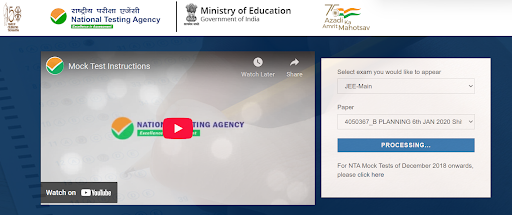
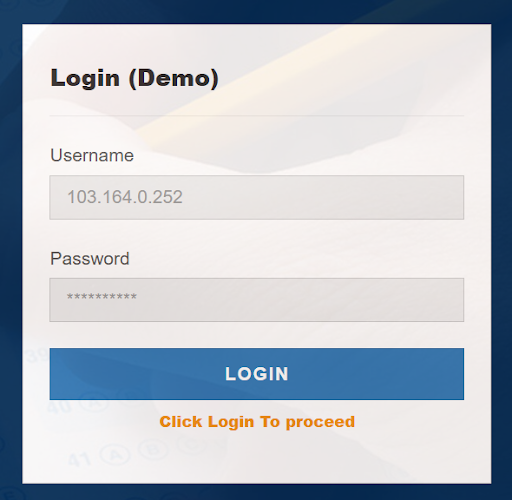
A new page will open for login. By default, a username & password are already set. Just click on “Login”.
- Read all the instructions carefully and click on “Proceed”.
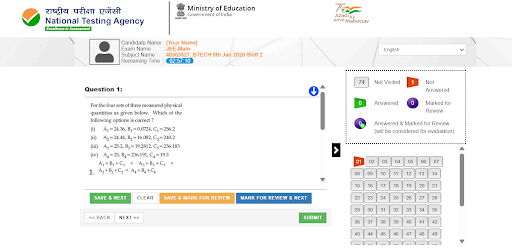
- After that, mock test will start and look like this.
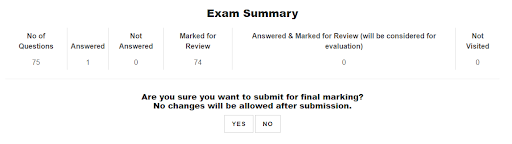
- Upon submission, the exam summary will be shown
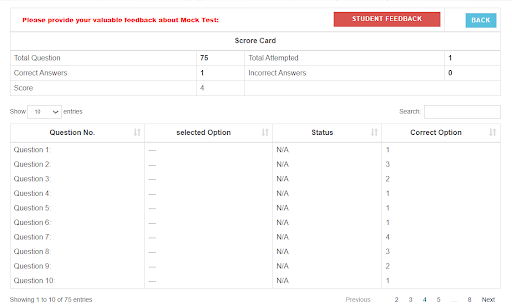
- Upon final submission, the result/ scorecard will be displayed.
How to Navigate to a Question While Attempting JEE Main Mock Test?
To answer a question in a mock test for JEE Main 2027:
- Click the question number in the Question Palette (on the right) to jump directly to it. Note: This does not save your current answer.
- Click Save & Next to save your answer and move to the next question.
- Click Mark for Review & Next to mark for review, then save and proceed to the next question.
How to Answer JEE Main Mock Test MCQs?
- To select your answer: Click the button next to one of the options.
- To deselect: Click the selected option again or use the Clear Response button.
- To change your answer: Click a different option’s button.
- To save: Always click Save & Next.
- To mark for review: Click Mark for Review & Next.
- To edit a saved answer: Return to the question via the Question Palette, then follow the steps above.
How to Navigate Between Sections of JEE Main Mock Test?
- Section names appear on the top bar of the screen. Click any section name to view its questions. The active section stays highlighted.
- After clicking Save & Next on the last question of a section, you automatically move to the first question of the next section.
- Switch between sections and questions anytime during the exam, within the time limit.
- View the section summary in the legend above the Question Palette for quick status checks.
Download Free JEE Main Previous Year Question Papers
JEE Main Mock Test 2027: Important Instructions
- The total duration of the selected Free JEE Main Mock test series is 180 Mins.
- A countdown timer in the screen’s top right corner shows your remaining exam time.
- The test ends automatically when it hits zero. No need to submit or end it yourself.
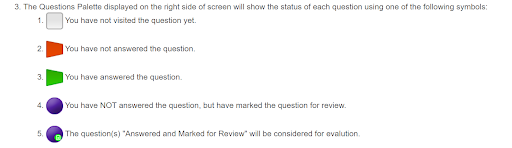
- The Question Palette on the right side of the screen shows the status of each question using different symbols. Each symbol indicates whether a question is visited, answered, unanswered, or marked for review during the exam.
- Grey symbol indicates you have not visited the question yet.
- Red symbol indicates you have not answered the question.
- Green symbol indicates you have answered the question.
- Purple symbol indicates you have not answered the question but have marked it for review.
- Purple with green dot symbol indicates questions that are answered and marked for review will be considered for evaluation.
- Click the > arrow to the left of the Question Palette to collapse it and expand the question window. To reopen the palette, click the < arrow on the right side of the question window.
- Click your Profile image in the top right corner to switch the exam language for the entire question paper. A dropdown will appear to select your preferred language.
- Click the down arrow to jump to the bottom of the question area and up arrow to jump to the top without scrolling.
JEE Main Previous Year Question Papers 2025
Aspirants can practice a free JEE Main mock test online here. Practice with official JEE Main 2025 question papers from session 1 as a mock test.
| Course | Exam Date & Shift | Question Paper PDF |
| B.Tech (Eng/Hin) | 22nd Jan 2025 Shift 2 | Download Here |
| B.Tech (Eng/Hin) | 23rd Jan 2025 Shift 2 | Download Here |
| B.Tech (Eng) | 24 Jan 2025 Shift 1 | Download Here |
| B.Tech (Eng) | 24 Jan 2025 Shift 2 | Download Here |
| B.Tech (Eng/Hin) | 28th Jan 2025 Shift 1 | Download Here |
| B.Tech (Eng/Hin) | 28th Jan 2025 Shift 2 | Download Here |
| B.Tech (Eng/Hin) | 29 Jan 2025 Shift 1 | Download Here |
| B.Arch (Eng/Hin) | 30 Jan 2025 Shift 2 | Download Here |
Also Check
| JEE Main 2025 Question Paper | JEE Main 2024 Question Paper |
| JEE Main 2023 Question Paper | JEE Main 2022 Question Paper |
| JEE Main 2021 Question Paper | JEE Main 2020 Question Paper |
FAQs
Ans. JEE Main Mock tests pattern is as follows:-
Total Questions: 75
Time duration: 3 hours
Total marks: 300
Correct answer: +4 marks
Incorrect answer: -1 marks
Not answered: 0 marks
Ans. JEE Main previous year’s question paper PDFs can be downloaded here: Download JEE Main Previous Year Question Paper